

GCC Recruiter Boolean Search Playbook 2026

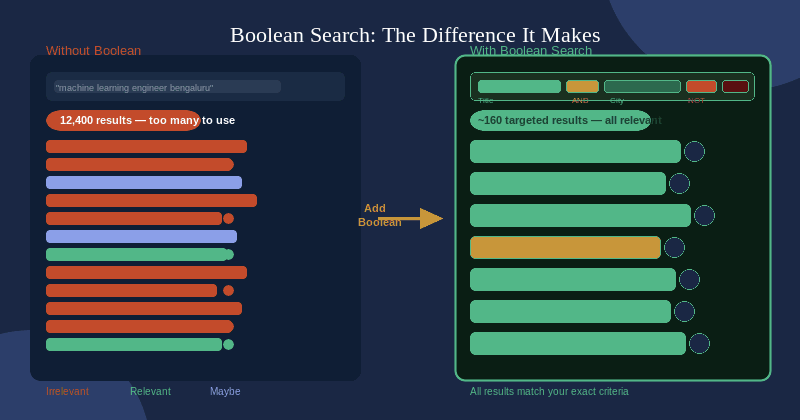
A well-built Boolean string turns a 12,000-result LinkedIn search into a shortlist of 150–300 precisely matched profiles. Most GCC recruiters are still searching one job title at a time — and missing the best candidates buried on page 28 of their results.
This playbook covers the logic behind Boolean search, the five mistakes that silently wreck your results, and how to use Google X-Ray and GitHub alongside LinkedIn. Then the part that actually matters: 10 ready-to-use Boolean strings for the most in-demand GCC roles in India. Each string includes a job title group, skill context, city group, and exclusion layer. Copy them, paste them, use them today.
📋 What This Playbook Covers
- 10 copy-paste Boolean strings — one per major GCC role type
- 3 sourcing platforms — LinkedIn Recruiter, Google X-Ray, GitHub
- Role families: SWE · ML/AI · Data Engineering · Cloud/SRE · Quant · Cybersecurity · Product · VLSI · Automotive · Healthcare
- Each string includes: job title group · skill context · city group · exclusion layer
- Who it’s for: In-house GCC TA teams and agency recruiters sourcing GCC mandates in India
Table of Contents
Why Boolean Search Is Still the Most Powerful Sourcing Tool in 2026
AI sourcing platforms have proliferated in 2026. Natural language search tools promise you can type “senior ML engineer in Bengaluru with startup experience” and receive a perfect shortlist. Some of them are genuinely useful for broad searches.
But they cannot give you surgical control over exactly which profiles appear and which do not. When you are sourcing for a Goldman Sachs GCC role requiring a Quantitative Researcher with fixed income derivatives experience, no AI tool will distinguish that profile as precisely as a well-built Boolean string. The AI surfaces “quantitative” profiles. You surface the exact one.
More practically: LinkedIn Recruiter’s Boolean search costs nothing extra, has no rate limits, and works right now with whatever seat you already have.
A well-built Boolean string typically reduces a 12,000-result search to 150–300 highly relevant profiles — eliminating 98% of irrelevant noise before you read a single profile. For GCC roles requiring a specific combination of skills, domain, city, and seniority, Boolean is the only sourcing tool precise enough to find that 0.5% of the talent pool you actually want.
The Three Boolean Operators You Must Know
Boolean logic uses three operators. Every string in this playbook is a combination of these three.
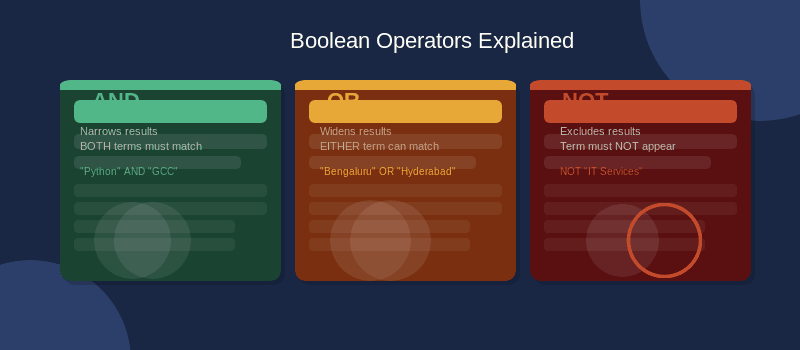
AND narrows your results. Every term connected by AND must appear in the profile. Use it to combine non-negotiable requirements. As you add more AND terms, your result count drops — which is exactly what you want when a search returns thousands of mismatched profiles.
OR widens your results. At least one connected term must appear. Use it for synonyms, alternate job titles, and related skills. In GCC hiring this matters enormously — a Goldman Sachs “Strat” is functionally identical to a Quantitative Developer at another firm, but they use completely different titles on LinkedIn.
NOT excludes results. For GCC sourcing specifically, NOT is one of your most powerful tools. GCCs are not IT services companies, and candidates with purely services backgrounds often lack the product ownership mindset GCCs require. NOT lets you filter them out at the search level, before you waste time reading profiles.
| Operator | What It Does | Use It For | Effect on Results |
|---|---|---|---|
| AND | All terms must appear | Non-negotiable requirements | ↓ Fewer, more precise results |
| OR | Any one term may appear | Synonyms, title variants, related skills | ↑ More results, catches all variants |
| NOT | Term must not appear | Removing irrelevant profiles and noise | ↓ Removes unwanted matches |
Always wrap groups of OR terms in parentheses before connecting with AND or NOT. ("Python" OR "Java") AND "GCC" — not "Python" OR "Java" AND "GCC". Without parentheses, LinkedIn interprets operators in a precedence order that almost certainly does not match your intent.
Anatomy of a Great Boolean String
Every effective Boolean string has the same three-part structure: a job title group, a skill or context group, and an exclusion layer. Build every string in this order and you will avoid the most common sourcing errors.
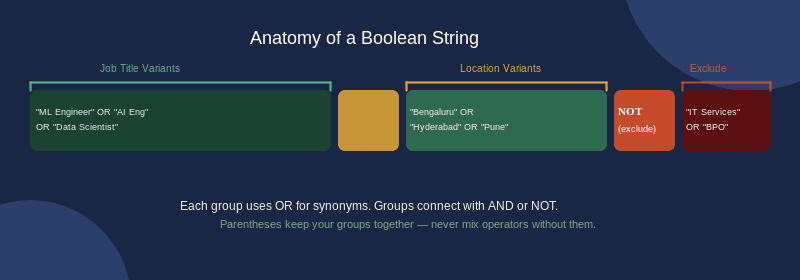
Part 1 — Job Title Group (OR cluster): Capture all the ways your ideal candidate might describe their role. A data engineer candidate might use “Data Engineer,” “ETL Developer,” “Analytics Engineer,” or “Big Data Engineer” — all functionally the same role. Include noun forms, abbreviations, and common title variants. For senior technical roles, include at least 5–8 title variants minimum.
Part 2 — Context / Skill / Location Group (AND + OR cluster): Narrow to your specific requirement using the technologies, tools, or cities that matter. Note that both spellings of Bengaluru — LinkedIn profiles use both, and missing either costs you real results.
Part 3 — Exclusion Layer (NOT): Remove profiles that technically match but are not relevant. For GCC roles, build a standard exclusion baseline you apply to every search: NOT "IT Services" NOT "Outsourcing" NOT "Staffing". Modify it per role, but always start here.
“machine learning engineer Bengaluru”
Result: 11,400 profiles. No exclusions. No title variants. Best candidates buried from page 3 onwards.
(“ML Engineer” OR “Applied Scientist” OR “GenAI Engineer”) AND (“PyTorch” OR “LangChain”) AND (“Bengaluru” OR “Bangalore”) NOT “IT Services” NOT “Staffing”
Result: 180–280 directly relevant profiles.
The 5 Mistakes That Silently Destroy Your Search Results
NOT "Staffing" NOT "Recruiting" unless sourcing TA professionals.The best match for your role may be on page 30, not page 1. Do not stop scrolling when early results look weak. Use LinkedIn’s left-panel filters (current company type, years of experience, function) alongside your Boolean string — filters handle structured data, Boolean handles keyword matching in profile text.
Platform-by-Platform: LinkedIn, Google X-Ray, GitHub
Boolean search works across multiple platforms, each with different strengths for GCC hiring. LinkedIn is your primary channel, but Google X-Ray and GitHub surface candidates who never appear in standard LinkedIn searches — and who are often the most technically credible ones.
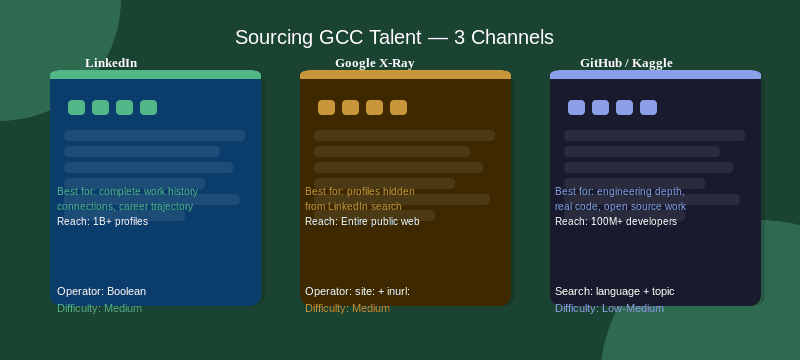
LinkedIn Boolean Search is your primary channel. The syntax uses AND, OR, NOT, parentheses, and quotation marks. Use LinkedIn’s left-panel filters in combination with your Boolean string: filters handle structured data (current company, years of experience), Boolean handles unstructured keyword matching in profile text. One powerful technique is the Past Company filter combined with Boolean — if you want to source candidates who previously worked at a specific GCC but have since moved on, set the company as a filter and use Boolean to narrow by current role and skills.
Google X-Ray Search uses Google to index LinkedIn’s public profiles — surfacing people who appear in Google’s results but may not surface in LinkedIn’s own search interface. The syntax differs: site:linkedin.com/in "machine learning engineer" ("bengaluru" OR "hyderabad") "Goldman Sachs". X-Ray bypasses LinkedIn’s algorithm entirely, showing profiles ordered by Google’s relevance ranking. Use it specifically when sourcing candidates who have worked at named GCCs, since past employers can be included directly in the query.
GitHub and Kaggle are underused for GCC technical roles. The candidates most likely to have the depth your mandate requires are often more active on GitHub than on LinkedIn. GitHub search syntax: language:Python topic:machine-learning location:India. The key signal is not repository existence — it is recent commit activity (last 30 days), repository stars (50+ is a strong indicator), and README documentation quality.
| Platform | Best For | Key Advantage | Limitation |
|---|---|---|---|
| LinkedIn Recruiter | Primary sourcing, all GCC roles | Largest professional network in India; combine Boolean with structured filters | Results not ranked by relevance; 2,000-char string limit |
| Google X-Ray | Sourcing alumni of specific GCCs; bypassing LinkedIn’s algorithm | Google relevance ranking shows a different shortlist; past employers searchable | Only indexes public profiles; no structured filters |
| GitHub | ML engineers, backend, data scientists | Commit activity and repo stars verify technical depth; passive candidates with no active LinkedIn | No Boolean syntax; manual outreach only |
| Kaggle | Data scientists, ML engineers | Competition performance is a verifiable depth signal; notebook quality shows actual work product | Smaller active base; India-specific filtering limited |
The 10 GCC Role Boolean Strings — Copy and Paste
These strings are built for LinkedIn Recruiter and optimised for GCC hiring in India. Each includes the job title group, skill/context group, city group, and exclusion layer. Adjust city names and specific technologies to match your mandate.
01 — Software Engineer / Full Stack Developer
("Software Engineer" OR "Software Developer" OR "Full Stack Engineer"
 OR "Full Stack Developer" OR "Backend Engineer" OR "SDE" OR "SDET")
AND ("Java" OR "Python" OR "Go" OR "Node.js" OR "Microservices" OR "Kubernetes")
AND ("Bengaluru" OR "Bangalore" OR "Hyderabad" OR "Pune" OR "Chennai")
NOT "IT Services" NOT "Outsourcing" NOT "BPO" NOT "Staffing" NOT "Fresher"
AND "React" — to narrow for frontend-heavy roles without rebuilding the full string.
02 — ML / AI Engineer
("Machine Learning Engineer" OR "ML Engineer" OR "AI Engineer"
 OR "Applied Scientist" OR "Research Engineer" OR "GenAI Engineer"
 OR "LLM Engineer" OR "MLOps Engineer")
AND ("Python" OR "PyTorch" OR "TensorFlow" OR "Hugging Face" OR "LangChain")
AND ("Bengaluru" OR "Bangalore" OR "Hyderabad")
NOT "IT Services" NOT "Outsourcing" NOT "Staffing" NOT "Internship"
03 — Data Engineer
("Data Engineer" OR "Data Engineering" OR "Big Data Engineer"
 OR "ETL Developer" OR "Data Pipeline Engineer" OR "Analytics Engineer")
AND ("Spark" OR "Kafka" OR "Airflow" OR "dbt" OR "Databricks" OR "Snowflake" OR "Flink")
AND ("Bengaluru" OR "Bangalore" OR "Hyderabad" OR "Pune")
NOT "IT Services" NOT "Outsourcing" NOT "Staffing" NOT "Fresher" NOT "Internship"
AND "Iceberg" for lakehouse architectures — to narrow directly to candidates with matching hands-on experience.
04 — Cloud / DevOps / SRE Engineer
("Cloud Engineer" OR "DevOps Engineer" OR "SRE" OR "Site Reliability Engineer"
 OR "Platform Engineer" OR "Cloud Infrastructure Engineer" OR "Cloud Architect")
AND ("AWS" OR "Azure" OR "GCP" OR "Kubernetes" OR "Terraform" OR "Helm" OR "ArgoCD")
AND ("Bengaluru" OR "Bangalore" OR "Hyderabad" OR "Pune" OR "Chennai")
NOT "IT Services" NOT "Outsourcing" NOT "BPO" NOT "Staffing"
05 — Quantitative Analyst / Strat (BFSI GCC)
("Quantitative Analyst" OR "Quant" OR "Quantitative Researcher"
 OR "Strat" OR "Quantitative Developer" OR "Risk Analyst" OR "Financial Engineer")
AND ("Python" OR "C++" OR "MATLAB" OR "Fixed Income" OR "Derivatives"
     OR "Risk Models" OR "Pricing Models" OR "Algorithmic Trading")
AND ("Mumbai" OR "Bengaluru" OR "Bangalore" OR "Hyderabad")
NOT "Staffing" NOT "Outsourcing" NOT "BPO" NOT "IT Services"
06 — Cybersecurity Engineer
("Cybersecurity Engineer" OR "Security Engineer" OR "Information Security"
 OR "AppSec Engineer" OR "Cloud Security Engineer" OR "SOC Analyst"
 OR "Threat Intelligence" OR "Penetration Tester" OR "Red Team")
AND ("SIEM" OR "SOAR" OR "Zero Trust" OR "CISSP" OR "CEH" OR "Cloud Security" OR "OWASP")
AND ("Bengaluru" OR "Bangalore" OR "Hyderabad" OR "Pune" OR "Delhi" OR "NCR")
NOT "IT Services" NOT "Staffing" NOT "Fresher"
07 — Product Manager (GCC)
("Product Manager" OR "Senior Product Manager" OR "Group Product Manager"
 OR "Principal PM" OR "Director of Product" OR "Product Lead")
AND ("B2B" OR "SaaS" OR "Platform" OR "API" OR "Enterprise" OR "Roadmap" OR "0 to 1")
AND ("Bengaluru" OR "Bangalore" OR "Hyderabad" OR "Pune")
NOT "IT Services" NOT "Outsourcing" NOT "Staffing" NOT "Associate PM"
08 — VLSI / Semiconductor Design Engineer
("VLSI Engineer" OR "RTL Design Engineer" OR "Chip Design Engineer"
 OR "Digital Design Engineer" OR "Verification Engineer" OR "SoC Engineer"
 OR "Analog Design Engineer" OR "Physical Design Engineer")
AND ("Verilog" OR "VHDL" OR "SystemVerilog" OR "UVM" OR "ASIC" OR "FPGA" OR "ARM")
AND ("Bengaluru" OR "Bangalore" OR "Hyderabad" OR "Pune" OR "Chennai")
NOT "Staffing" NOT "Outsourcing" NOT "Fresher" NOT "Trainee"
09 — Automotive / Embedded Software Engineer (ER&D GCC)
("Embedded Software Engineer" OR "Embedded Systems Engineer"
 OR "Automotive Software Engineer" OR "AUTOSAR Engineer"
 OR "Embedded C Engineer" OR "Firmware Engineer")
AND ("AUTOSAR" OR "CAN" OR "LIN" OR "ADAS" OR "ECU" OR "MISRA" OR "Embedded C" OR "RTOS")
AND ("Pune" OR "Bengaluru" OR "Bangalore" OR "Chennai" OR "Hyderabad")
NOT "Staffing" NOT "Outsourcing" NOT "IT Services"
10 — Healthcare Data / Clinical Informatics (Healthcare GCC)
("Healthcare Data Analyst" OR "Clinical Data Analyst" OR "Health Informatics"
 OR "Biostatistician" OR "Clinical Informatics" OR "Real World Evidence"
 OR "Pharmacovigilance Analyst" OR "Drug Safety Analyst")
AND ("SAS" OR "R" OR "Python" OR "CDISC" OR "SDTM" OR "HL7" OR "FHIR" OR "Clinical Trials")
AND ("Hyderabad" OR "Bengaluru" OR "Bangalore" OR "Pune" OR "Chennai")
NOT "Staffing" NOT "IT Services" NOT "Fresher"
To learn more advanced sourcing techniques, read our article 10 AI Prompts Every GCC Recruiter Should Save Right Now.
How to Save and Maintain Your String Library
Building a string library takes one afternoon. Maintaining it takes 30 minutes a month. The return compounds indefinitely — every future search for the same role family starts from a tested baseline instead of from scratch.
Organise by role family, not by individual mandate. You do not need a new string for every job requisition. One master string per role family — ML Engineer, Data Engineer, Embedded Engineer — gets modified per mandate. The 10 strings above are your starting role families.
Keep modification notes alongside each string. When you narrow a master string for a specific mandate — adding AND "Kafka" for a role requiring streaming experience, for example — note why you made the change. The next time a similar mandate comes in, start from the modified version.
Review strings quarterly. Job titles evolve. “GenAI Engineer” barely existed as a title two years ago. If a variant is becoming common in your target talent pool, add it to your string. If a term is generating too many irrelevant results, tighten the exclusion layer.
Save LinkedIn searches for evergreen roles. LinkedIn Recruiter lets you save searches and receive alerts when new profiles match. For evergreen roles like ML Engineer, Data Engineer, and Cloud Engineer, saving the search converts it from a one-time event into a passive sourcing pipeline that runs without ongoing effort.
Share strings across your full TA team. If you are part of an in-house GCC TA function, a shared Boolean library in a Notion or Google Doc is one of the highest-leverage tools your team can build. One recruiter’s refinement of the ML Engineer string benefits everyone who uses it next — quality compounds across the team. Check the GCC India Directory to understand which GCCs are active per city and sector before you finalise your city group for any mandate.
For Tier-1 city searches (Bengaluru, Hyderabad, Pune), a well-built string for a senior technical role should return 100–400 profiles. Above 500 means the string is too broad — add another AND clause. Below 50 means it is too narrow — remove your most restrictive AND clause and see which profiles reappear. Semiconductor and cybersecurity strings will naturally return fewer results because those talent pools are genuinely smaller.
Frequently Asked Questions
Does Boolean search work in LinkedIn Recruiter Lite or only Corporate?
Boolean AND, OR, and NOT operators work in both Recruiter Lite and Recruiter Corporate. The difference is in the structured filters available alongside the search — Corporate has more filter categories. The Boolean logic itself works on both plans. Start with the strings in this playbook on whichever seat you have.
LinkedIn is showing “No results” with my string. What went wrong?
Usually one of three issues: an AND clause that is too restrictive, a NOT clause excluding too much, or the string exceeding LinkedIn’s 2,000-character limit. Start by removing the skill group entirely — run just title plus city — then add back constraints one at a time until results disappear. That pinpoints the culprit clause.
How many results should a good GCC Boolean search return?
For Tier-1 city searches, a well-built string for a senior technical role should return 100–400 profiles. Above 500 means the string is too broad — add more AND clauses. Below 50 means it is too narrow — remove the most restrictive AND clause. Semiconductor and cybersecurity strings will naturally return fewer results because those talent pools are genuinely smaller across India.
Are these strings GCC-specific or will they work for IT services hiring too?
These strings are built for GCC hiring with GCC-specific NOT exclusions. If sourcing for IT services roles, remove the NOT “IT Services” clause. The rest of each string — skill-focused, city-specific, title-precise — still gives you significantly more precision than a basic keyword search regardless of context.
Should I save Boolean searches in LinkedIn to get alerts for new profiles?
Yes — this is one of the most underused features in LinkedIn Recruiter. Once you have a string that works well for an evergreen role (ML Engineer, Data Engineer, Cloud Engineer), save it and enable alerts. LinkedIn notifies you when new profiles match your criteria, converting your search from a one-time sourcing event into a passive pipeline.
How do I find candidates who previously worked at a specific GCC like Flipkart or Google?
Use Google X-Ray search: site:linkedin.com/in “your role title” “Bengaluru” “Flipkart”. Google indexes past employers mentioned anywhere in a public LinkedIn profile, surfacing alumni even when the GCC is listed as a past employer. Inside LinkedIn Recruiter, combine your Boolean string with the Past Company filter to achieve the same result without leaving LinkedIn.
Cross-reference your shortlist with the GCC India Directory to confirm which GCCs are active in each city and sector.
Use GCC Pay Compass to benchmark compensation before you extend an offer — so your shortlist does not fall through at the offer stage.